-1.png?height=120&name=1f83348385b37474578a1d1ffd78b3c8adef03e0%20(1)-1.png)
Learn how to create and edit Entity objects in CureMint.
Table of Contents
Available with any of the following subscriptions, except where noted:
 Procure-to-Pay
Utilize Entities in CureMint to efficiently handle and arrange all the unique legal or financial units within your organization in a unified system. Entities are commonly designated for a company, a business unit, a department, a division, or any other distinct entity that necessitates individualized financial reporting.
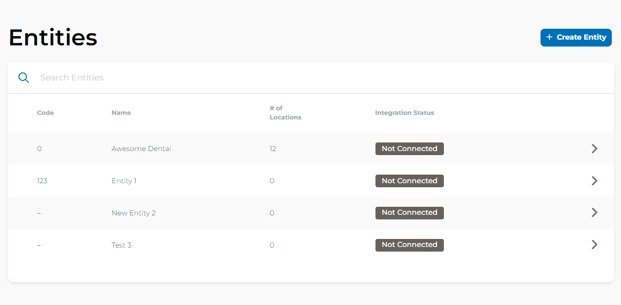
Please Note: Only Organizational Administrators have the permission to create an entity.
Creating an Entity
To create an entity
- In your CureMint account, navigate to the Entity Icon on your left side navigation bar.
- In the upper right, click +Create Entity.
- In the Create Entity Modal, enter the details of the Entity.
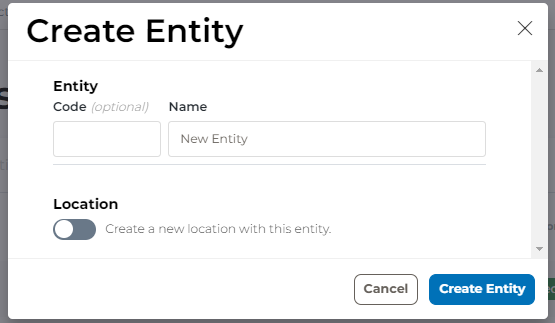
- Switch on the Location toggle if you wish to create a Location that is not currently available in CureMint.
- Enter the details of the location you would like to create in the Create a new location with this entity section of the modal.
Please Note: Creating a location will automatically associate the Location with the created entity.
- Click Create Entity.
Editing an Entity
-
To Edit and Entity
- In your CureMint account, navigate to the Entity Icon on your left side navigation bar.
- Select the row of the entity you wish to edit.
- In the Entity Detail page, select the edit icon in the upper right of the page.
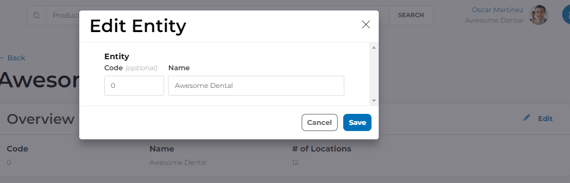
- In the Edit Entity modal, enter or remove the details you would like to adjust.
- Click Save to save your changes.
This form is used for documentation feedback only. For more help email help.me@curemint.io