-1.png?height=120&name=1f83348385b37474578a1d1ffd78b3c8adef03e0%20(1)-1.png)
What is Off-Catalog Ordering?
Off-Catalog Ordering is a feature that gives purchasers the ability to order products from your organization's approved vendors that are not in your organization's catalog (hence the term "off-catalog"). This gives offices and purchasers flexibility to order any product from the list of approved vendors in CureMint without having to go through the product request process to get an item added to the catalog.
Please Note: Off-Catalog ordering is a feature that can be activated/deactivated by an organization's Org Admins. If you do not see the option to place an Off-Catalog order outlined in the steps below, your organization's Org Admins have opted not to offer access to this feature for your organization.
How to Place an Off-Catalog Order
Navigate to the Off Catalog section along the top of your Store homepage.
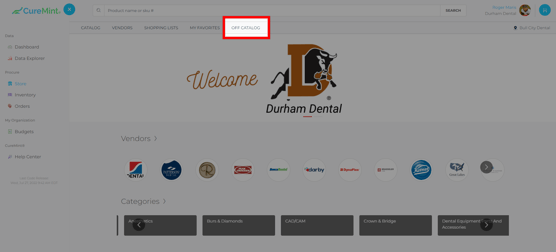
Once on the Off Catalog page, you will see a simple form to provide some basic information about the product(s) you need to order:
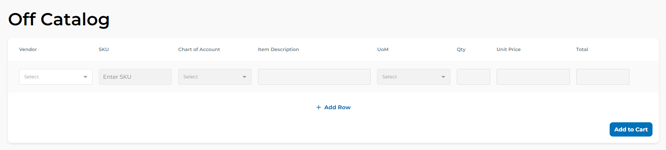
Vendor: Select the vendor from your organization's list of pre-approved vendors
SKU: Sometimes also referred to as 'item number'.
Chart of Account: If your organization leverages this functionality, you will see this option. If the SKU entered is already associated with a Chart of Account by your organization, this field will auto-populate.
NOTE: Depending on your organization's settings, this field may be required.
Item Description: Item name/key identifying characteristics of the item (such as size or color). If the SKU entered is found in CureMint's product library, this field will auto-populate.
UoM: Unit of Measure - this field is only required if the vendor you are ordering from requires this information. If the vendor requires this field, you will see a dropdown menu of options will be available to select from.
Qty: How many of this product are you adding to your cart?
Unit Price: What is the price of this item? If the SKU entered is already associated with a price for your organization, this field will auto-populate.
NOTE: If the SKU is associated with multiple prices, you may see a dropdown to select a price.
Total: This field will auto-populate with the total amount for this line item (Qty x Unit Price). This field is for your benefit as a reference, you do not need to add any information in this field.
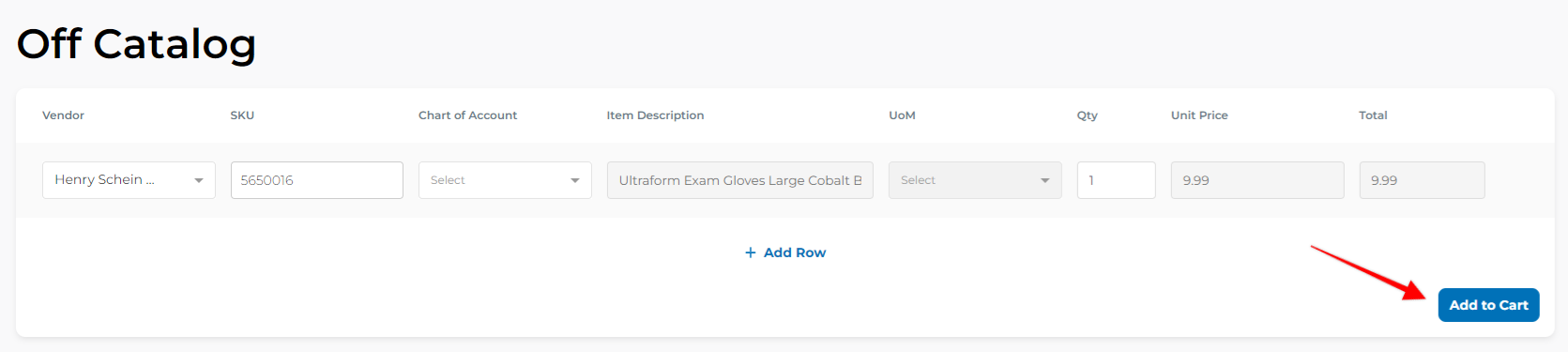
When you are finished filling in this information for your Off Catalog products select Add to Cart and proceed to checkout as you would with any other order!
A few notes about off-catalog ordering:
- The information you enter is the information that gets sent to the vendor. If any information provided is incorrect, the vendor will follow-up with you to clarify.
- If you do not see the 'Off-Catalog' options shown in the screenshots above, your organization has opted out of this feature. If you would like to enable it for your organization, reach out to your organization's Catalog Manager/CureMint Admin.
- Just like with 'on-catalog' orders, you can add multiple off-catalog products to your cart, from multiple vendors. You can also order a mix of on-catalog and off-catalog items to your cart and proceed through one checkout experience.
Still have more questions? Please reach out to support@curemint.io.