-1.png?height=120&name=1f83348385b37474578a1d1ffd78b3c8adef03e0%20(1)-1.png)
Bill Stages
Table of Contents
Available with any of the following subscriptions, except where noted:
 Procure-to-Pay
Bill stages assist in organizing bills based on their position within the bill management process. Utilizing the Bill stage property aids in identifying the current status of a specific bill and enhances the understanding of bill management collaboration required among procurement, accounts payable, and accounting teams.
Bill Stages
Bill stages are used to track how bills move forward in your process.
The Bill stage property contains the following default stages:
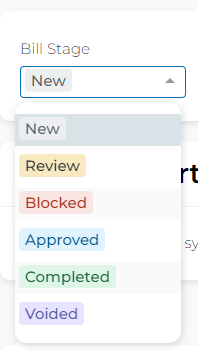
- New: Bills that have been posted but are still waiting for some attention.
- Review: Bills that are a bit rebellious and don't quite fit into the auto approval workflow, prompting a need for a closer look.
- Blocked: Bills that are currently in a standstill due to external factors, such as ongoing disputes with the vendor.
- Approved: Bills that have the sign off to be posted as an official bill in your accounting software.
- Completed: There is not any further action to perform for this posted bill.
- Voided: Bills that you'd like to keep on record, but don't require any further action and won't impact the posted A/P for the business.
Please Note: The payment status of a bill is an independent status than that of a bill stage. Depending on your internal processes, there may be associations between the two.
Automations Tied to Bill Stages
Certain bill stages trigger automations that help with your bill management workflow.
New |
|
Approved |
|
Completed |
|
Voided |
|
Update a bill records bill stage
To update the Bill stage property, you can do the following:
- Individually update the bill stage from the bill detail page.
- Individually update the bill stage from the bill preview drawer.
- Bulk update the bill stage from the bill list page.
This article is used for documentation feedback only. For more help email help.me@curemint.io