-1.png?height=120&name=1f83348385b37474578a1d1ffd78b3c8adef03e0%20(1)-1.png)
Last Updated: February 23, 2024
After placing an order in CureMint, you can create chart of accounts associations on the items that were ordered. This is especially useful if the item is ordered often as the chart of accounts will be automatically applied the next time it's ordered.
To create a chart of accounts association on an order item:
- In your CureMint account, navigate to Orders.
- Find the desired order and click on the Order Number.
- On the order detail page, find the Suborder to the desired vendor.
- Next to Order Items on the Suborder, click on the Dropdown Button.
- On the Order Item row, click on the Dropdown Button on the far right.
- Select a Chart of Accounts in the Chart of Accounts Dropdown.
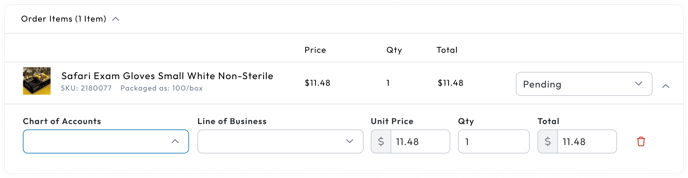
- A Save Association banner will appear.
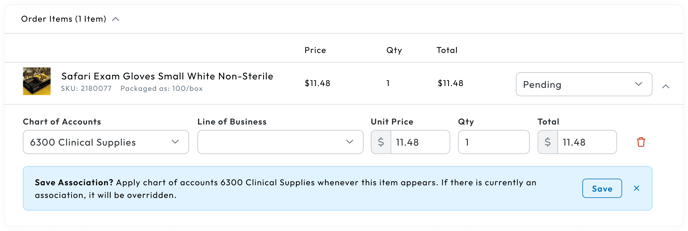
- Click Save in the Save Association banner.
Please Note: If you do not wise to save the association and only update it on the single order, click the "X" button in the banner.
- An Update Items modal will appear.
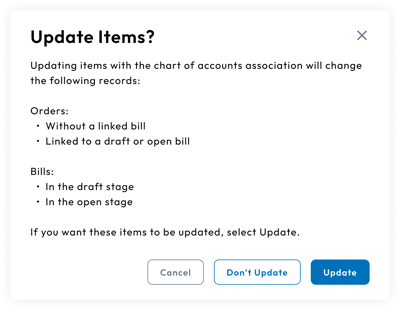
- Select one of the options in the Update Items Modal:
- Update: The update option will save the chart of accounts association, apply the association on all future records that contain the item, and update existing records that contain the item that are one of the following:
- An order without a linked bill
- An order linked to a draft bill
- An order linked to an open bill
- A bill in the draft stage
- A bill in the open stage
- Update: The update option will save the chart of accounts association, apply the association on all future records that contain the item, and update existing records that contain the item that are one of the following:
Please Note: For organizations with the Procurement subscription, selecting the Update option will update all existing orders where the item exists.
-
- Don't Update: The don't update option will save the chart of accounts association and apply the association on all future records that contain the item. Currently existing records will not be affected.
This form is used for documentation feedback only. For more help email help.me@curemint.io