-1.png?height=120&name=1f83348385b37474578a1d1ffd78b3c8adef03e0%20(1)-1.png)
Chart of Accounts Associations
Last Updated: February 23, 2024
Table of Contents
- Chart of Accounts Associations
- Automatically Applying a Chart of Accounts Association
- Set Up Charts of Accounts Associations
- Update an Item's Chart of Accounts Association
- Chart of Accounts Associations and Budgets
- Chart of Accounts Associations and Order Rules
Available with any of the following subscriptions, except where noted:
 Procure
 Procure-to-Pay
Chart of accounts associations play a crucial role in simplifying the process of connecting a particular item to a chart of accounts. Once an association is established, the chart of accounts is automatically selected whenever the item is mentioned in a record. These associations can be easily modified or removed at any given time.
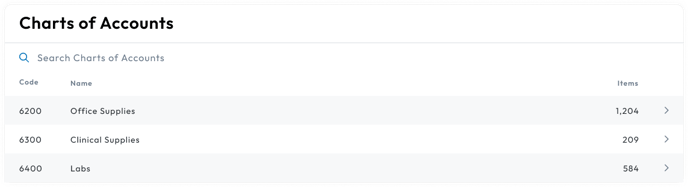
Chart of Accounts Associations
Chart of accounts associations are a powerful tool that automatically links an item to a specific chart of accounts whenever it is mentioned in a record.
This association is established based on the item's information being connected to a chart of account. The information needed to associate an item is:
- Vendor: The name of the company supplying the item
- SKU: The unique code that identifies the item
- Name: The title or description of the item
Please Note: Either SKU or Name is needed for the association, both are not required. If both exist on a saved association, the combination of Vendor + SKU will be used to try to associate the chart of accounts.
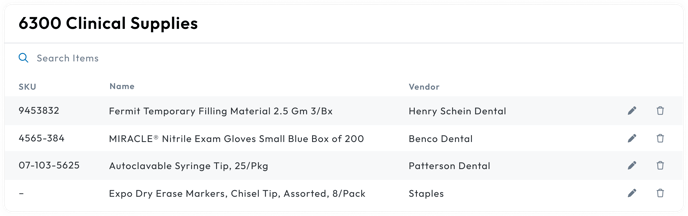
Automatically Applying a Chart of Accounts Association
The unique item information allows the chart of accounts to be automatically applied whenever the item's information appears on a record.
Saved associations are checked in the following combination order to try to automatically apply it:
- The Vendor + SKU combination
- If there is no SKU, we will check the Vendor + Name combination
- If the check doesn't find anything, then the chart of accounts is left empty
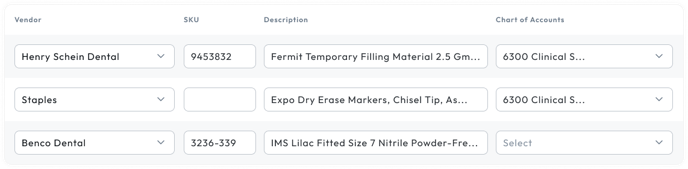
When a save association is found, the chart of accounts is automatically applied to the item when:
- The item is ordered
- The item appears on an order
- The item is included on a bill
Please Note: Only Customers with the Procure-to-Pay Subscription will have access to bills
Set Up Charts of Accounts Associations
Once you have established the chart of accounts for your organization, you can proceed to create associations on items. If your organization does not have a chart of accounts, you will need to create one in order to set up associations.
Chart of account associations can be created on the following items:
- Set a chart of accounts on an order item
- Set a chart of accounts on a bill item
- Set a chart of accounts on an item while placing an order
Please Note: Only users with the Organization Admin or Bill Manager permissions can create a chart of accounts associations.
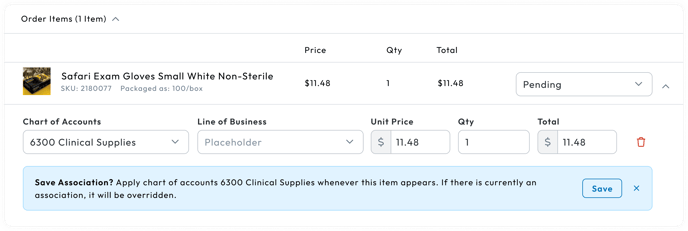
Update an Item's Chart of Accounts Association
Updating a chart of accounts association is a flexible process that can be done at any time. It gives you the ability to make changes that can impact both existing and future records, or solely future records, depending on your preferences.
To update the chart of accounts association, you have the following options:
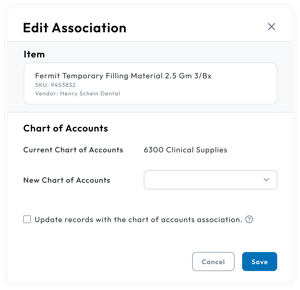
Chart of Accounts Associations and Budgets
Chart of accounts associations can be used to automatically assign order items to a budget. To do so you must:
- Create a budget with an included chart of accounts
- Ensure the items are associated to the chart of accounts
When an item associated to that chart of accounts is added to the cart, the budget will also appear.
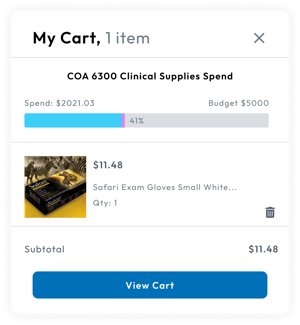
Chart of Accounts Associations and Order Rules
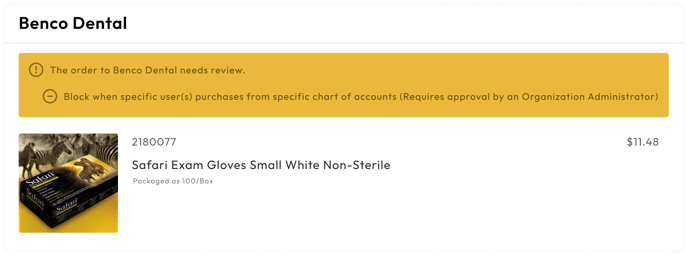
Chart of accounts associations can be used to automatically trigger order rules. To do so you must:
- Create an order rule with a chart of accounts condition
- Ensure the items are associated to the chart of accounts
When an item associated to that chart of accounts is ordered, the order rule is triggered.
This form is used for documentation feedback only. For more help email help.me@curemint.io