-1.png?height=120&name=1f83348385b37474578a1d1ffd78b3c8adef03e0%20(1)-1.png)
This article explains how Procure and Payables Spend are calculated within a usage-based subscription model
Table of Contents
- How is Procure Spend Calculated
- How is Payables Spend Calculated
- View your Spend Tier and Metrics
- View Your Spend Period Tier Breakdown
- Notifications
- Upgrade Subscription and Spend Tiers
Available with usage based subscriptions.
For customers using a usage based subscription model, Procure and Payables Spend is the dollar amount associated with a transaction that count towards your spend tier. This article outlines billing information related to Procure and Payables Spend.
How is Procure Spend Calculated
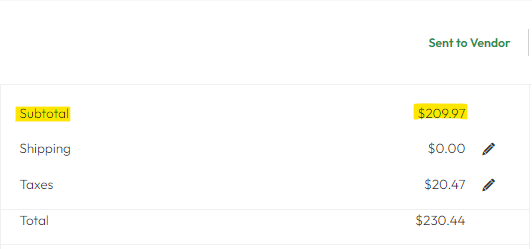
Procure spend is calculated by taking the absolute value of all the items (subtotal) on an order at the time it was approved.

Please Note:
- Ancillary fees such as shipping and taxes are not used in the calculation of Procure Spend.
- Any adjustments after the order has been approved will not impact Procure Spend.
- After-the-fact Purchase Orders are EXCLUDED from Procure Spend calculations.
How is Payables Spend Calculated
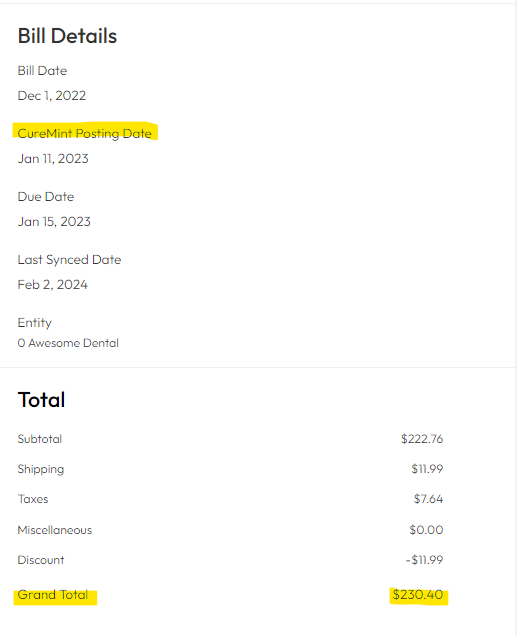
Payables spend is calculated by taking the absolute value of the stated total of all bill record at the time of posting to the "New" bill stage.
Please Note:
- Any adjustments after the bill has been posted will not impact the Payables Spend calculation.
- Bills marked as duplicates at time of posting will be EXCLUDED from Payables Spend calculations.
View your Spend Tier and Metrics
You can view your spend information at anytime by visiting your Usage and Limits report provided to you by your customer success manager.
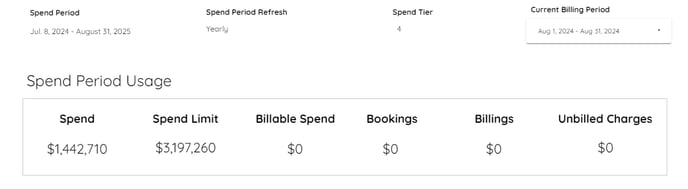
Spend Period |
|
Spend Period Refresh |
|
Spend Tier |
|
Current Billing Period |
|
Spend |
|
Spend Limit |
|
Billable Spend |
|
Bookings |
|
Billings |
|
Unbilled Charges |
|
View Your Spend Period Tier Breakdown
As spending accumulates during the spend period, you will be able to see how it aligns with the spend tiers and the corresponding billing impact based on your subscription. Spend within your subscribed tier will not incur charges, while spend that exceeds your subscribed tier will be billed according to the corresponding rate outlined in the spend period breakdown table.
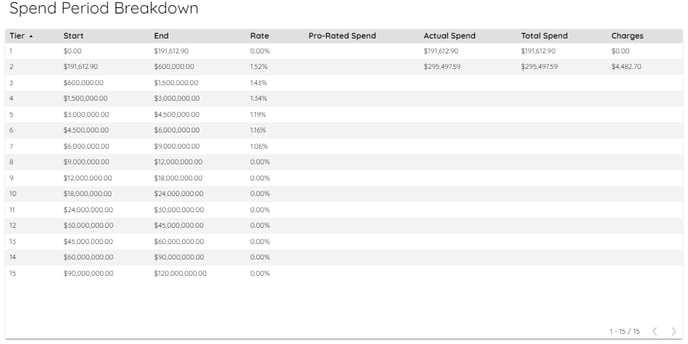
Tier |
|
Start |
|
End |
|
Rate |
|
Pro-Rated Spend |
|
Actual Spend |
|
Total Spend |
|
Charges |
|
Please Note:
Unbilled charges from a given billing period will be billed on the 5th of the following month.
Notifications
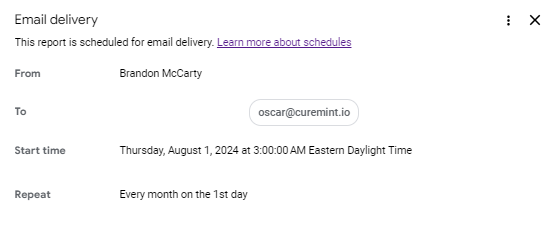
Users who are set as an account contact will receive an email notification at 3:00 am Est on the first of each month. To add a user as an account contact, contact your Customer Success Manager.
Upgrade Subscription and Spend Tiers
You have the option to upgrade your subscription to a higher spend tier at any time to avoid additional spend usage charges.
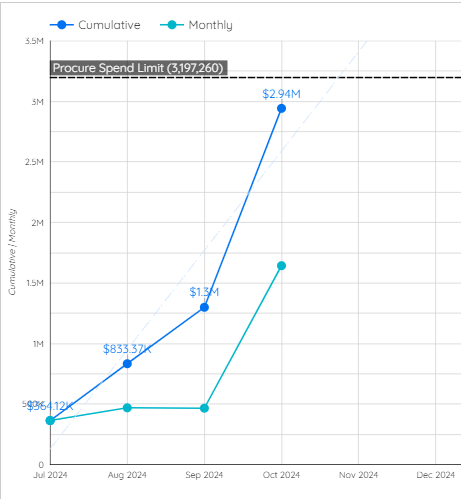
You cannot decrease your spend tier until your renewal date outlined in your commitment agreement. Even if spend is below your subscribed spend tier, your account will not automatically be downgraded.
If you have additional questions about Procure and Payables spend, reach out to your Customer Success Manager.
This article is used for documentation feedback only. For more help email help.me@curemint.io