-1.png?height=120&name=1f83348385b37474578a1d1ffd78b3c8adef03e0%20(1)-1.png)
Variance between Order Item and linked Bill Item prices
Table of Contents
Available with any of the following subscriptions, except where noted:
 Procure-to-Pay
The Unfavorable Item Variance Report offers valuable insights into the financial differences between the Orders created in CureMint and the Bills received from Vendors. You always have the option to approve and pay bills with exceptions, knowing that the variance calculation will be available for you to dispute bills with vendors in more efficient and aggregated way. This data empowers you to approach vendors with a summary of any overcharges accumulated over a specific period, allowing you to dispute and potentially receive credit notes and refunds.
Viewing the report
The Unfavorable Item Variance Report is a custom report located in the Data Explorer.
- In your CureMint account, navigate to Data Explorer > Explore.
- In the drop down select Custom Reports
- Navigate the enabled custom reports for your organization and select the Unfavorable Item Variance Report
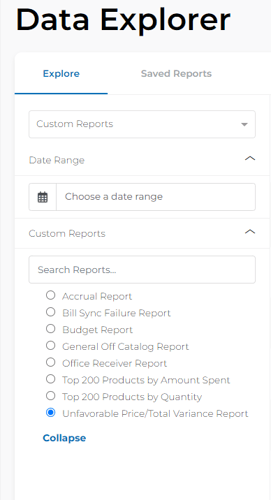
- By default the date range of the report is Year-to-Date but you can adjust the date range using the Date Range filter.
Please Note: The Date Range filter is tied to the CureMint Posting Date.
- The report will show a preview of the report
- Select Export to Email to receive the full report
- The report will be sent to your email address
- You can also download it from CureMint by navigating to Data Explorer > My Exports
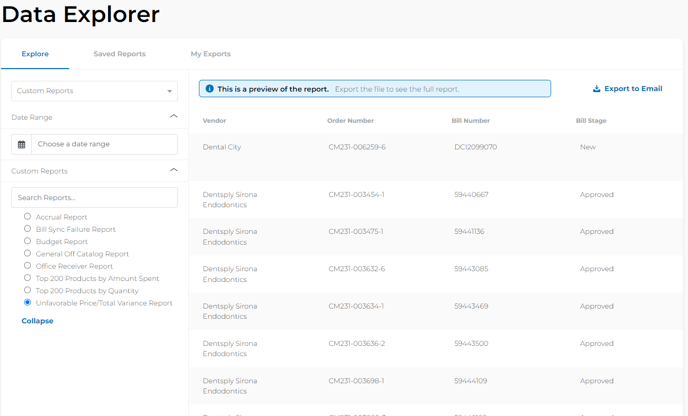
Please Note: Export times may vary depending on the report's size. All exports will be in .csv file format.
Information covered in the report
- The report includes a row for each Bill Item that meet the following criteria:
- Bill items that are linked to an Order Item
- Bill items that have a unit price greater than the unit price of the linked Order Item
Caution: Not all variances and exceptions will be included in this report. Exceptions such as unlinked bill items and quantity issues will be excluded. Additionally, selecting the update PO button on a bill will remove the variance between the linked item.
- The following data will be included in the report
Vendor |
|
Order Number |
|
Bill Number |
|
Bill Stage |
|
CureMint Posted Date |
|
Bill Date |
|
Due Date |
|
Bill Item Chart of Accounts |
|
Bill Item Location |
|
Bill Item Number |
|
Bill Item Description |
|
Bill Item Unit Price |
|
Bill Item Quantity |
|
Bill Item Total |
|
Order Item Number |
|
Order Item Description |
|
Order Item Unit Price |
|
Order Item Quantity |
|
Linked Order Item Quantity |
|
Linked Order Item Total |
|
Unfavorable Item Unit Price Variance |
|
Unfavorable Item Total Variance |
|
Tip: In Microsoft excel or Google Sheets, create a pivot table on the vendor to highlight the total variance per vendor.
This article is used for documentation feedback only. For more help email help.me@curemint.io